Pioneer AVH-X5800BHS Multimedia Receiver Instruction Manual
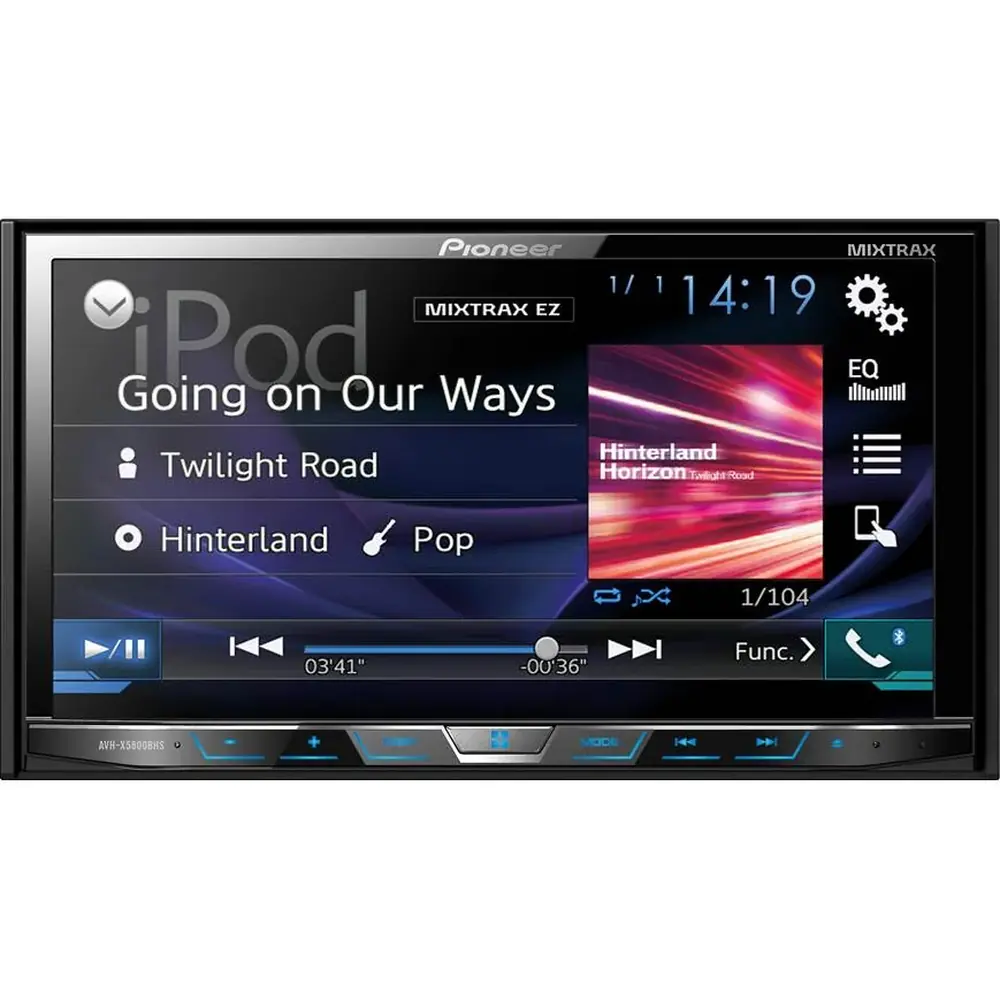
Pioneer AVH-X5800BHS Multimedia Receiver


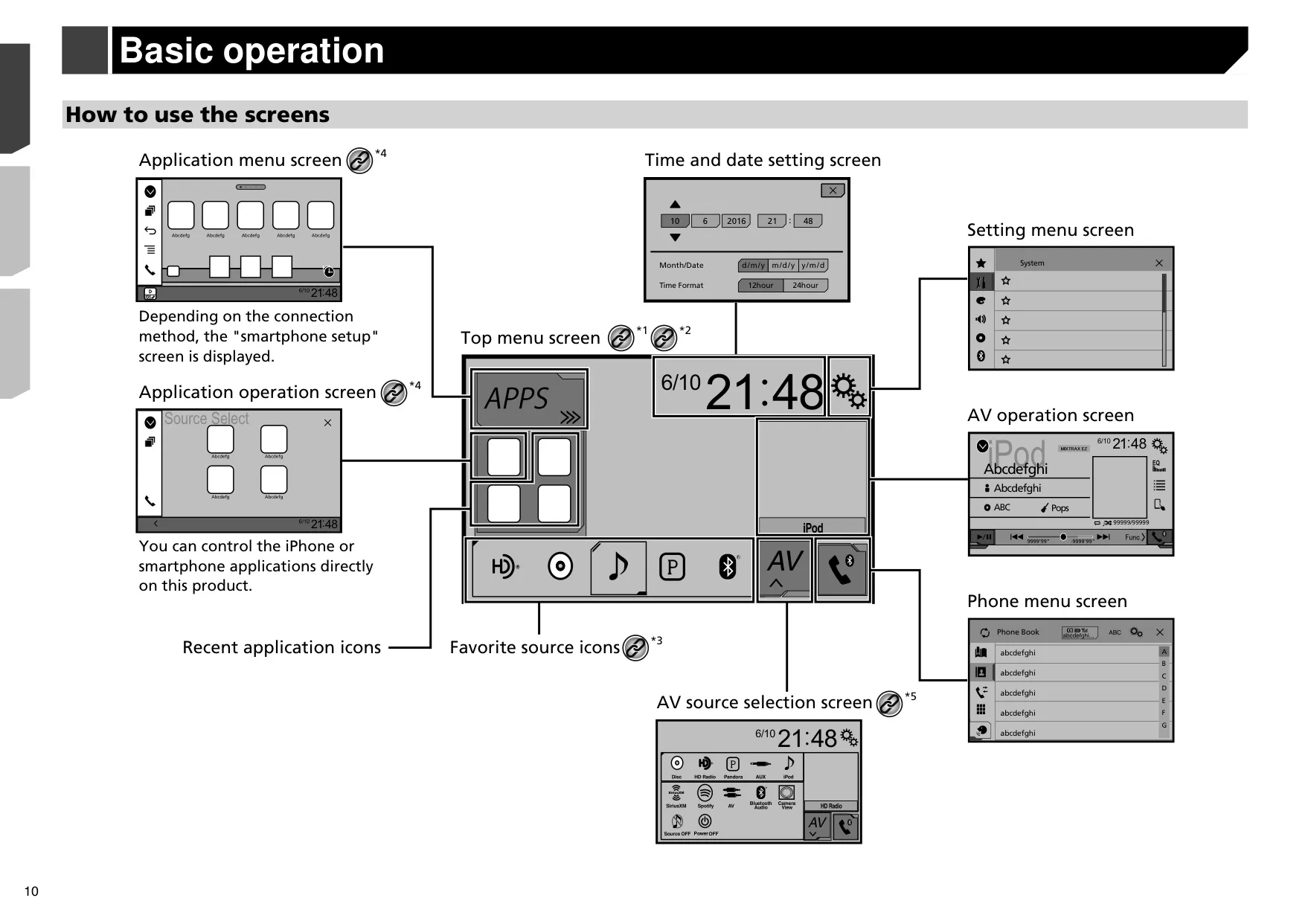


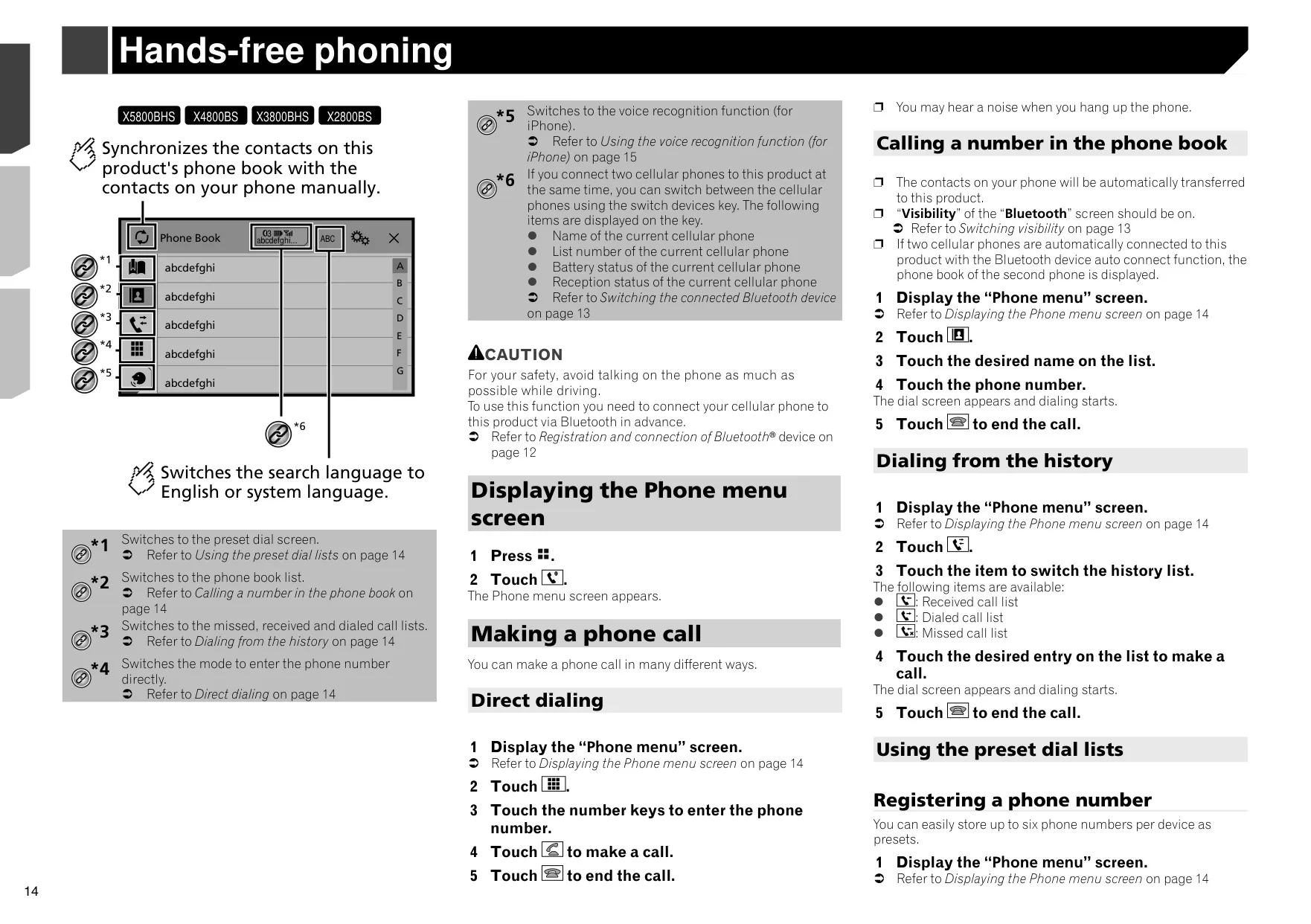


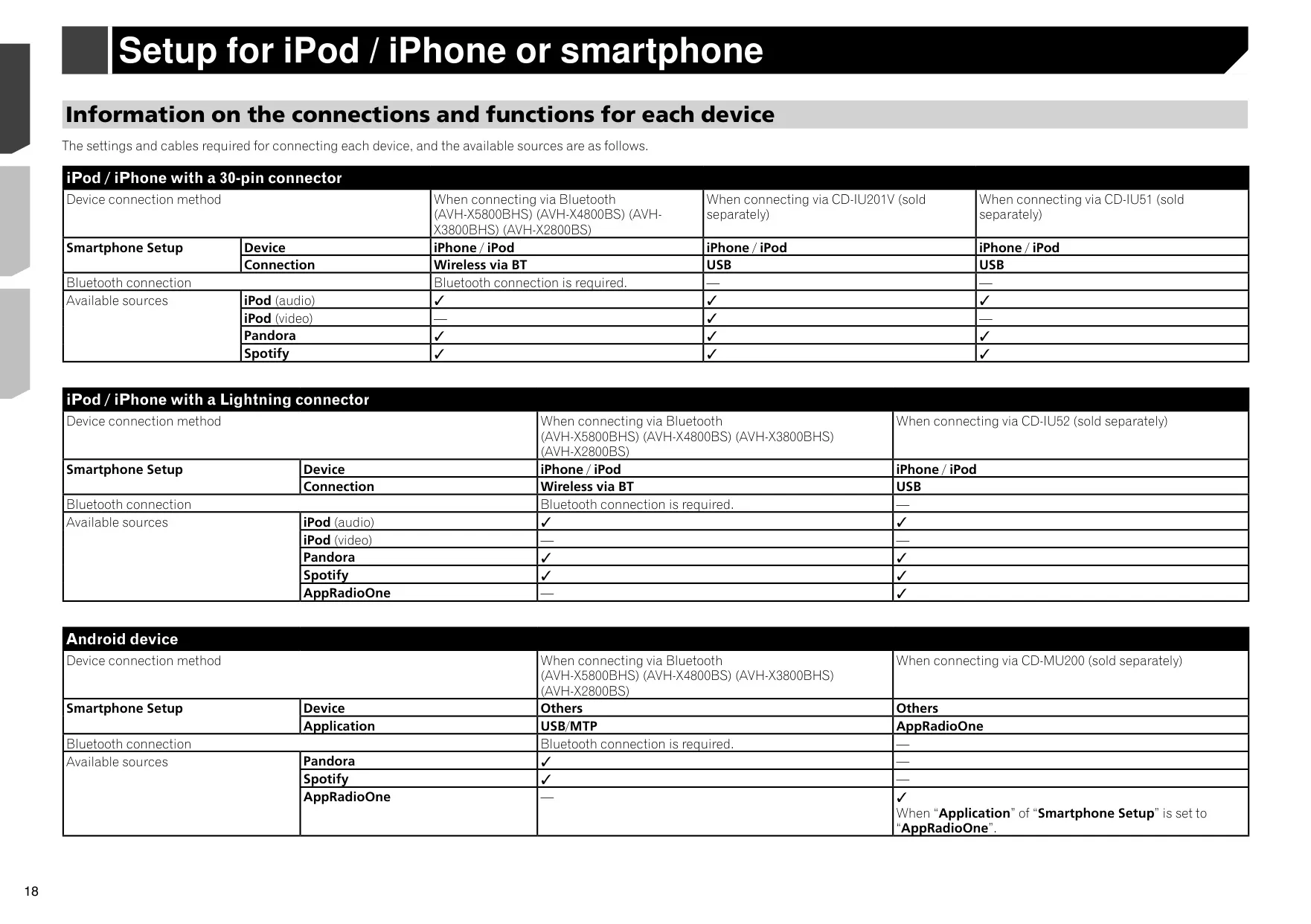














Pioneer AVH-X5800BHS Instructions
Here we offer the Pioneer AVH-X5800BHS Multimedia Receiver manual completely free and in English. We have cataloged this manual in the Multimedia Receiver section on Manualverse, and it has been rated by 1 users with an average rating of 5. If you have any specific questions about Pioneer AVH-X5800BHS Multimedia Receiver, we suggest checking the Frequently Asked Questions (FAQs) section of this manual.
Product Images


Pioneer AVH-X5800BHS Multimedia Receiver Specifications
| Feature | Specification |
|---|---|
| Product Type | DVD RDS AV Receiver |
| Rated Power Source | 14.4 V DC (10.8 V to 15.1 V allowable) |
| Grounding System | Negative type |
| Maximum Current Consumption | 10.0 A |
| Fuse Rating | 10 A |
| Chassis Dimensions (W × H × D) | 178 mm × 100 mm × 165 mm (7 in. × 3-7/8 in. × 6-1/2 in.) |
| Nose Dimensions (W × H × D) | 171 mm × 97 mm × 18 mm (6-3/4 in. × 3-7/8 in. × 3/4 in.) |
| Weight | 1.8 kg (4.0 lbs) |
| Screen Size / Aspect Ratio | 6.95 inch wide / 16:9 |
| Effective Display Area | 156.6 mm × 81.6 mm (6-1/8 in. × 3-1/4 in.) |
| Pixels | 1,152,000 (2,400 × 480) |
| Display Method | TFT active matrix driving |
| Color System | PAL / NTSC / PAL-M / PAL-N / SECAM compatible |
| LED Backlight Lifetime | More than 10,000 hours |
| Maximum Power Output | 50 W × 4 ch / 4 Ω, or 50 W × 2 ch / 4 Ω + 70 W × 1 ch / 2 Ω (subwoofer) |
| Continuous Power Output | 22 W × 4 (50 Hz to 15 kHz, 5 % THD, 4 Ω load, both channels driven) |
| CEA2006 Power Output | 14 W RMS × 4 channels (4 Ω and ≤1 % THD+N) |
| CEA2006 S/N Ratio | 91 dBA (reference: 1 W into 4 Ω) |
| Load Impedance | 4 Ω (4 Ω to 8 Ω allowable; 2 Ω for 1 ch) |
| Recommended Speakers | Over 50 W maximum input, 4 Ω to 8 Ω (do not use 1 Ω to 3 Ω) |
| Preout Output Level (max) | 4.0 V |
| Graphic Equalizer | 13 bands: 50 Hz / 80 Hz / 125 Hz / 200 Hz / 315 Hz / 500 Hz / 800 Hz / 1.25 kHz / 2 kHz / 3.15 kHz / 5 kHz / 8 kHz / 12.5 kHz |
| Equalizer Gain | ±12 dB (2 dB/step) |
| Standard Mode HPF | 50 / 63 / 80 / 100 / 125 / 160 / 200 Hz; slope –6, –12, –18, –24 dB/oct, OFF |
| Standard Mode Subwoofer / LPF | 50 / 63 / 80 / 100 / 125 / 160 / 200 Hz; slope –6, –12, –18, –24 dB/oct, OFF |
| Network Mode HPF (High) | 1.25 kHz to 12.5 kHz (11 steps); slope –6, –12, –18, –24 dB/oct |
| Network Mode HPF (Mid) | 25 Hz to 250 Hz (11 steps); slope –6, –12, –18, –24 dB/oct, OFF |
| Network Mode LPF (Mid) | 1.25 kHz to 12.5 kHz (11 steps); slope –6, –12, –18, –24 dB/oct, OFF |
| Network Mode Subwoofer | 25 Hz to 250 Hz; slope –12, –18, –24, –30, –36 dB/oct, OFF |
| Subwoofer Gain / Phase | +10 dB to –24 dB (1 dB/step); Normal / Reverse |
| Time Alignment | 0 to 140 steps (1 inch/step) |
| Bass Boost Gain | +12 dB to 0 dB |
| Speaker Level | +10 dB to –24 dB (1 dB/step) |
| DVD Drive System | DVD-Video, VCD, CD, MP3, WMA, AAC, DivX, MPEG player |
| Usable Discs | DVD-VIDEO, VIDEO-CD, CD, CD-R, CD-RW, DVD-R, DVD-RW, DVD-R DL (12 cm only) |
| DVD Region Number | 1 |
| Sampling Frequency (Disc) | 32 kHz / 44.1 kHz / 48 kHz / 96 kHz |
| Quantization Bits | 16 bit / 20 bit / 24 bit, linear |
| Frequency Response | 5 Hz to 22,000 Hz (DVD, 48 kHz sampling) |
| DVD Signal-to-Noise Ratio | 91 dB (1 kHz) (IHF-A network) (RCA level) |
| Video Output Level | 1.0 Vp-p / 75 Ω (±0.2 V) |
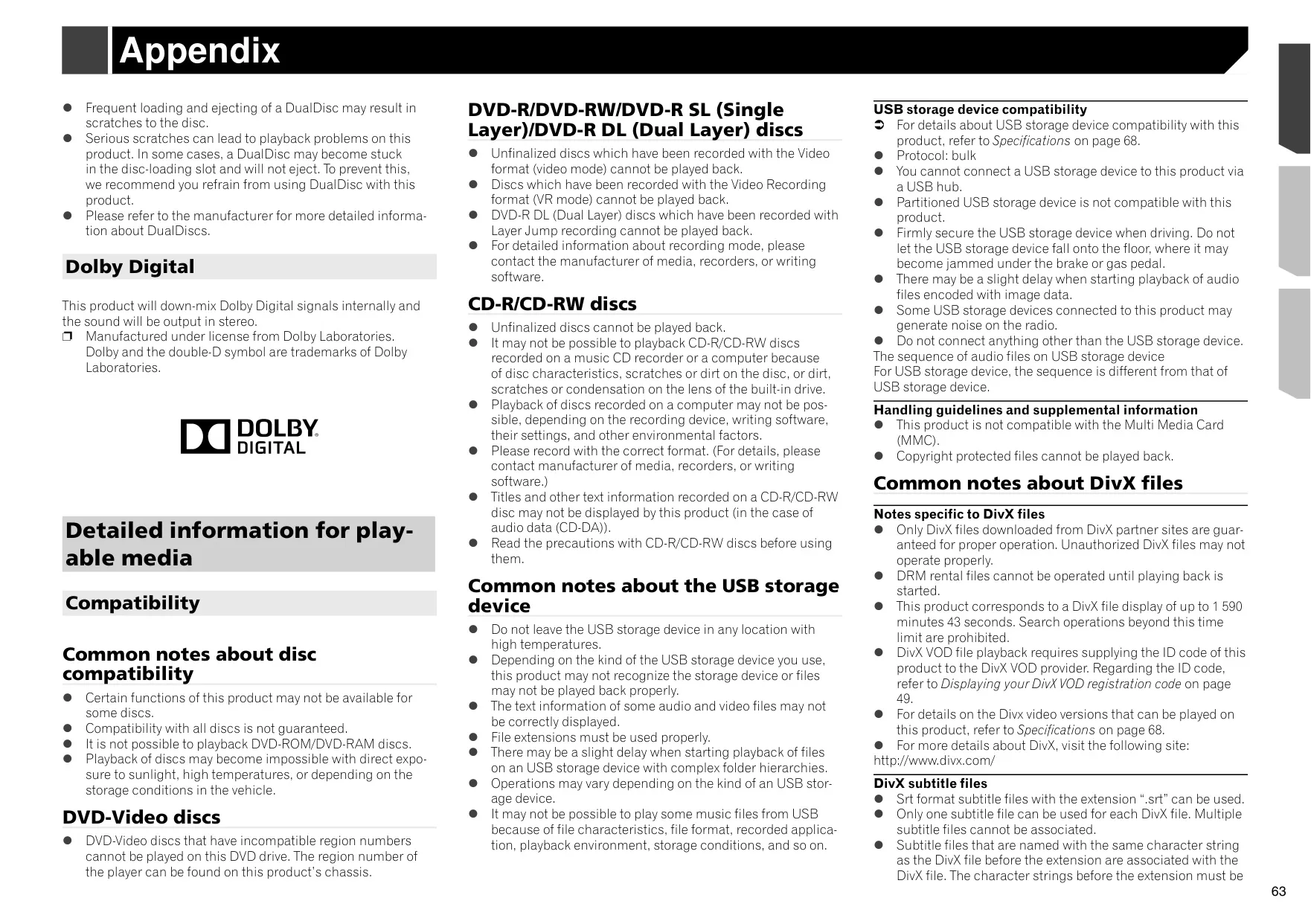
| Number of Audio Channels | 2 (stereo); Dolby Digital down-mixed to stereo |
| DivX Decoding Format | Home Theater Ver. 3, 4, 5.2, 6 (except Ultra and HD): .avi, .divx |
| MPEG Video Decoding | MPEG-1, MPEG-2, MPEG-4 (part 2), MS MPEG-4 (ver. 3) |
| USB Standard | USB 1.1, USB 2.0 full speed, USB 2.0 high speed |
| USB Max Current Supply | 1.0 A |
| USB Class | MSC (Mass Storage Class), MTP (Media Transfer Protocol) |
| USB File System | FAT16, FAT32 |
| USB Folder / File Limit | 1,500 folders / 15,000 files |
| USB Playable File Types | MP3, WMA, AAC, WAV, FLAC, H.264, MPEG4, JPEG |
| MP3 Decoding | MPEG-1 & 2 Audio Layer 3; 8 kbps to 320 kbps (CBR), VBR |
| WMA Decoding | Ver. 7, 7.1, 8, 9, 10, 11, 12 (2 ch audio) |
| AAC Decoding | MPEG-4 AAC (iTunes encoded only), .m4a (Ver. 10.6 and earlier) |
| FLAC Decoding | Ver. 1.3.0; 8 kHz to 48 kHz |
| WAV Signal Format | Linear PCM, 16 / 22.05 / 24 / 32 / 44.1 / 48 kHz (MSC mode only) |
| JPEG Decoding | .jpeg, .jpg, .jpe; 4:2:2, 4:2:0; max 8,192 × 7,680, min 32 × 32 |
| USB Video Decoding | H.264 Base Line Profile, MPEG4 Simple Profile; max 640 × 360, 30 fps, 2 GB |
| Bluetooth Version | Bluetooth 3.0 certified |
| Bluetooth Output Power | +4 dBm max. (Power class 2) |
| Bluetooth Frequency Band | 2,400 MHz to 2,483.5 MHz |
| Registered Bluetooth Devices | Up to 3 (2 phones connected simultaneously) |
| FM Frequency Range | 87.9 MHz to 107.9 MHz |
| FM Usable Sensitivity | 11 dBf (0.8 µV / 75 Ω, mono, S/N: 30 dB) |
| FM Signal-to-Noise Ratio | 80 dB digital / 72 dB analog (IHF-A network) |
| AM Frequency Range | 530 kHz to 1,710 kHz |
| AM Usable Sensitivity | 28 µV (S/N: 20 dB) |
| AM Signal-to-Noise Ratio | 80 dB digital / 62 dB analog (IHF-A network) |
| Supplied Microphone Cable | 4 m (13 ft. 1 in.) |
| System Remote Output (Blue/White) | Max. 300 mA, 12 V DC |
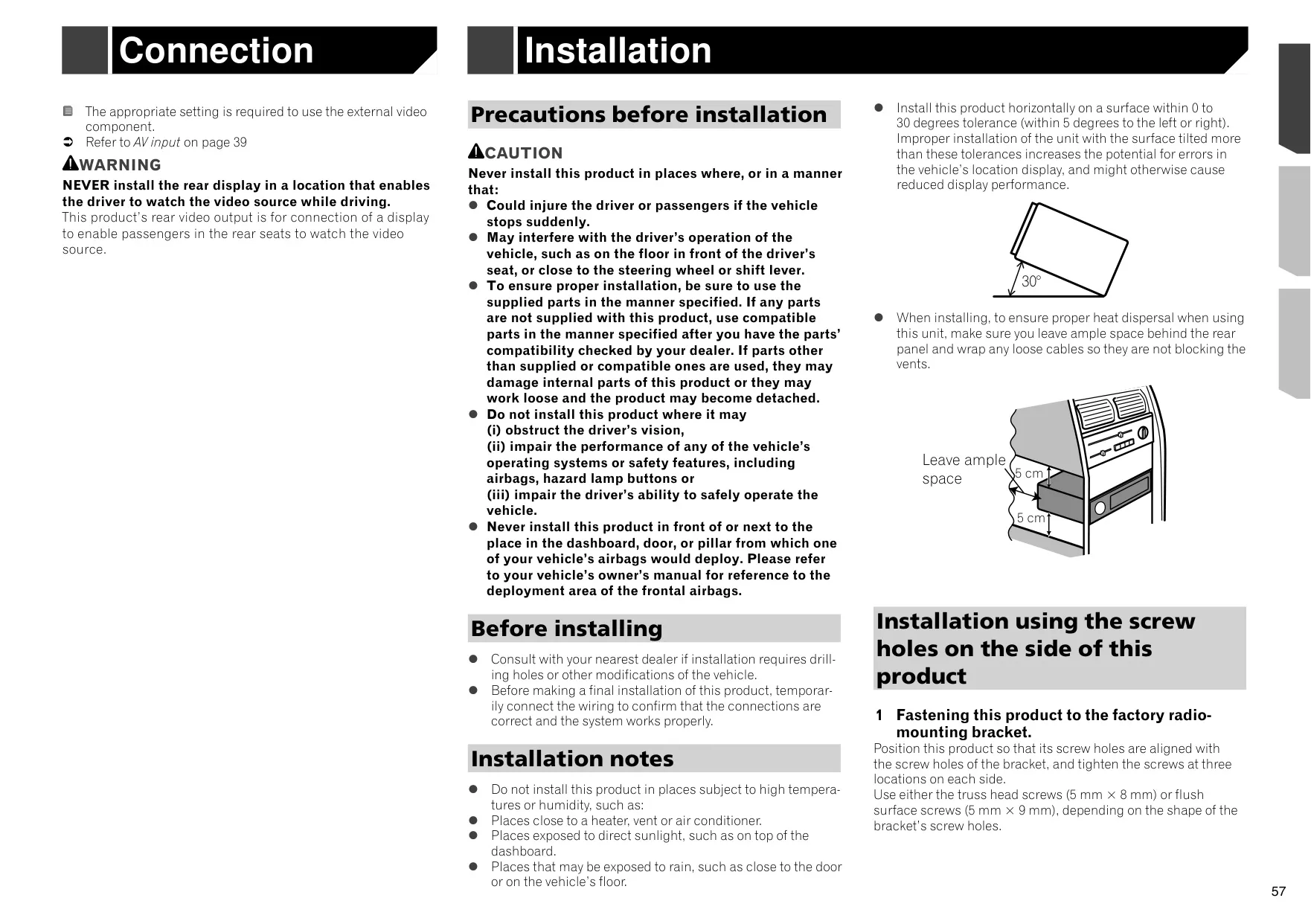
| Installation Angle | 0 to 30 degrees (within 5 degrees left or right) |
Pioneer AVH-X5800BHS Receiver Details
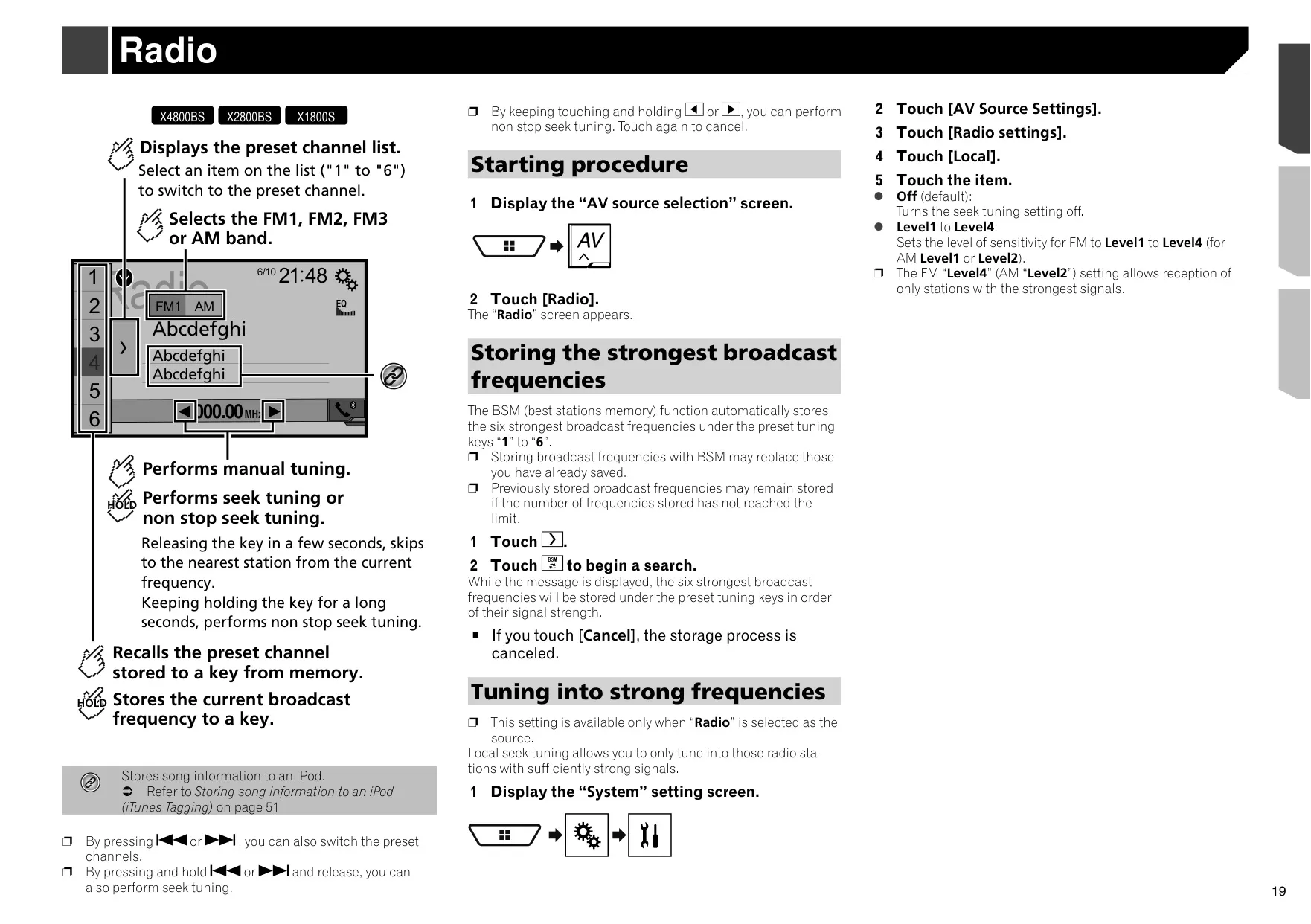
The Pioneer AVH-X5800BHS is a double-DIN DVD receiver with a motorized flip-down LCD panel. The panel tilts to several angles for better visibility, and the disc-loading slot sits behind it. The unit has a built-in HD Radio™ tuner that receives digital AM and FM broadcasts. It also supports FM multicasting on HD2/HD3 channels, and it can display song titles, artist names and album art. The Blending option switches to the analog signal on the same frequency when digital reception gets weak.
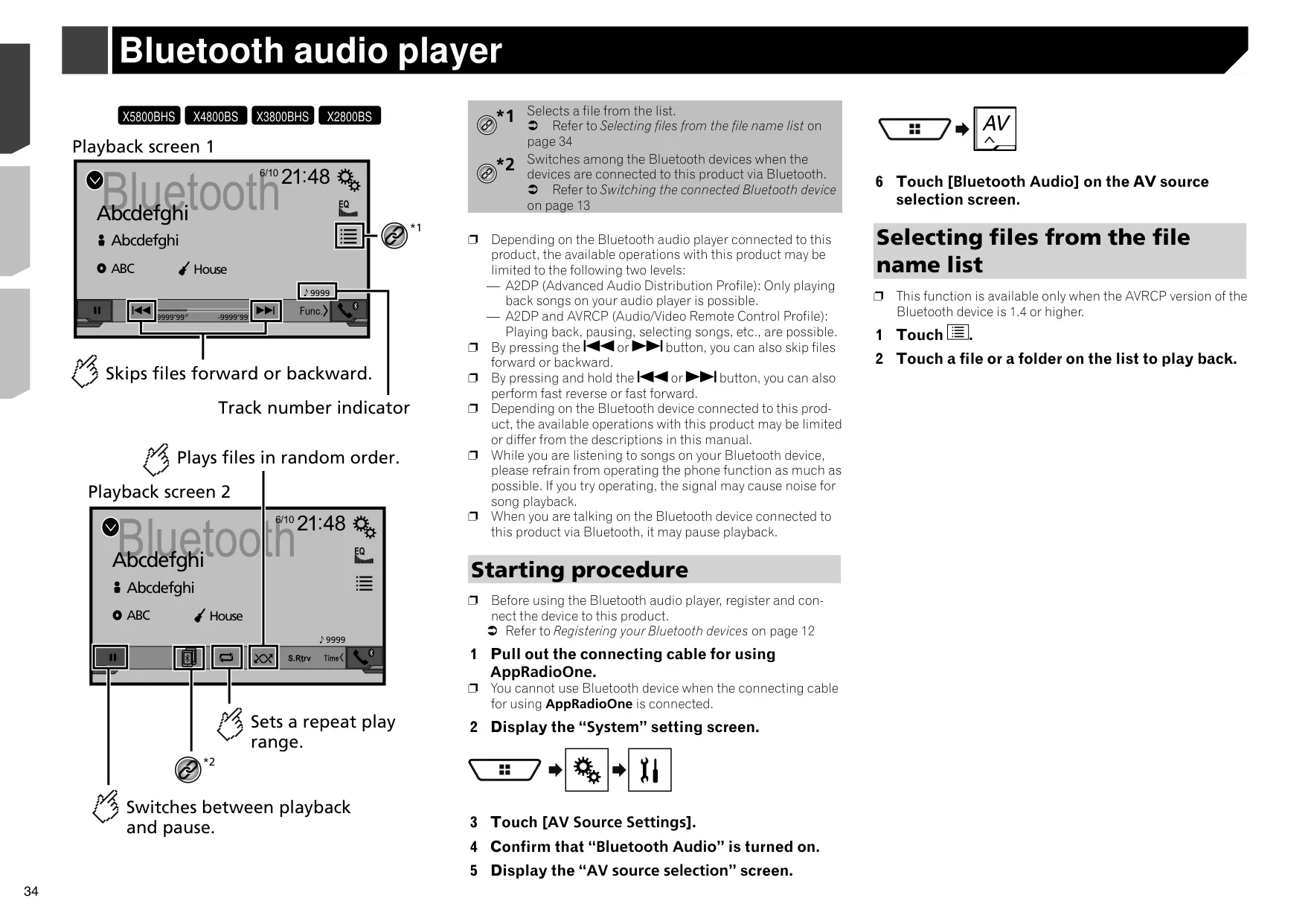
For streaming and smartphone use, the receiver supports AppRadioOne, which mirrors compatible iPhone or Android apps on the screen. You can control those apps with taps, drags and flicks. It also offers built-in Pandora® and Spotify® sources. On Pandora you can give thumbs up or down and bookmark tracks, and on Spotify you can save tracks to Your Music. An audio mix function plays app audio, such as navigation prompts, over the current AV source, and you can set each volume separately.
Hands-free calling uses the supplied microphone. You can store up to six preset numbers per phone, transfer the phone book, invert names, answer calls automatically and switch to private mode. If you connect an iPhone running iOS 6.1 or later, you can use Siri Eyes Free by pressing and holding the Home button. When two phones are connected, a switch-devices key lets you move between them, and it shows each phone's battery and signal status.
The receiver is SiriusXM-Ready. With an optional SiriusXM Connect Vehicle Tuner, it supports TuneStart™, TuneScan™, TuneMix™, SportsFlash™ alerts, Traffic & Weather Now, Featured Favorites and passcode-protected Parental Control. iTunes Tagging stores information for up to 50 songs heard on the radio and sends it to a connected iPod. MIXTRAX blends your USB or iPod tracks into non-stop mixes with DJ-style effects and lighting that flashes in time with the music.
Audio tuning includes two speaker configurations: Standard Mode and 3-way Network Mode. Auto EQ and Time Alignment measure your car's acoustics with an optional microphone and adjust the sound to match. You also get seven equalizer presets, a Sound Retriever that improves compressed music, loudness compensation, auto level control and Source Level Adjuster. You can save your sound settings and load them again later. The listening position can be centered on the driver, the front seats or the whole cabin.
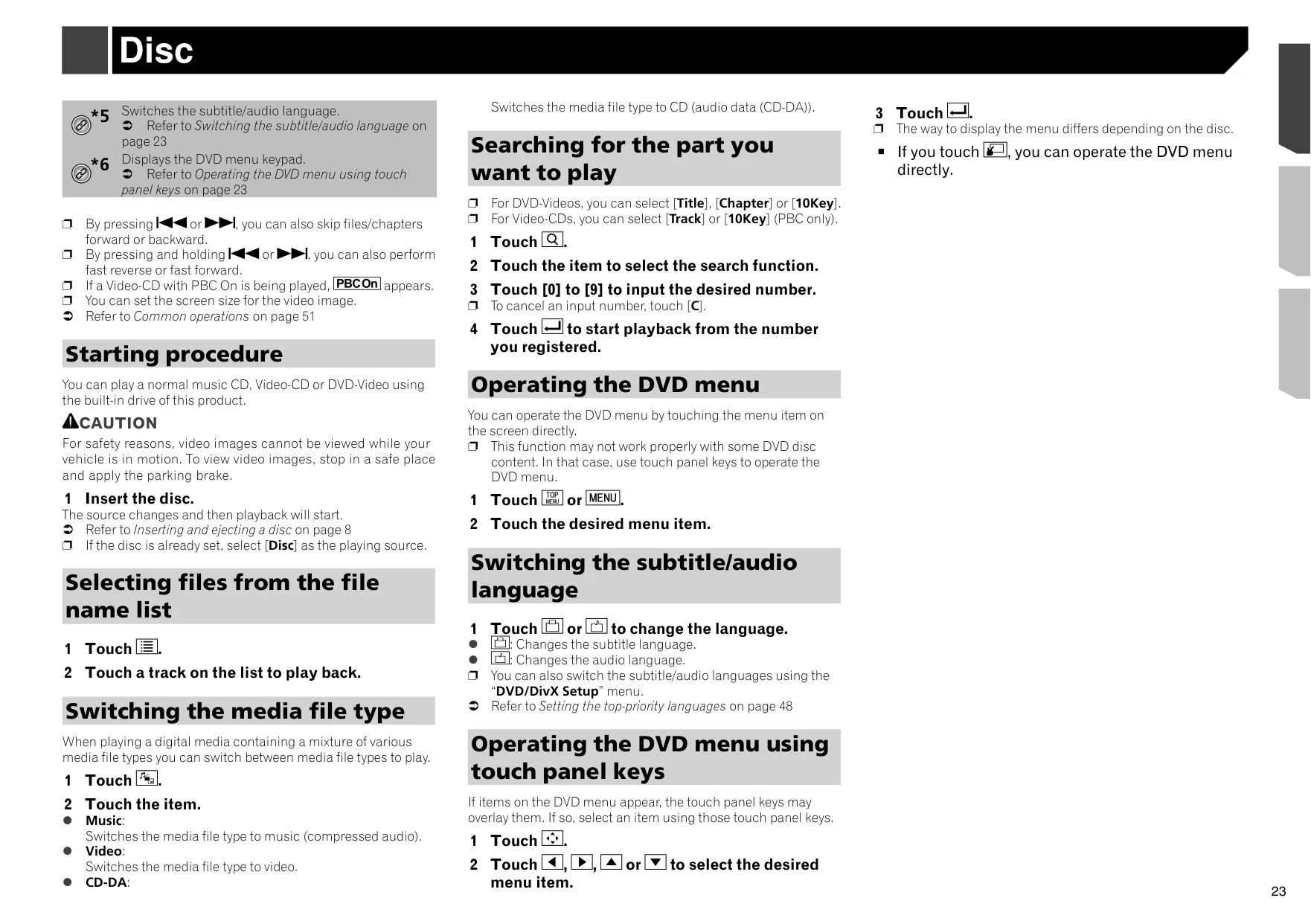
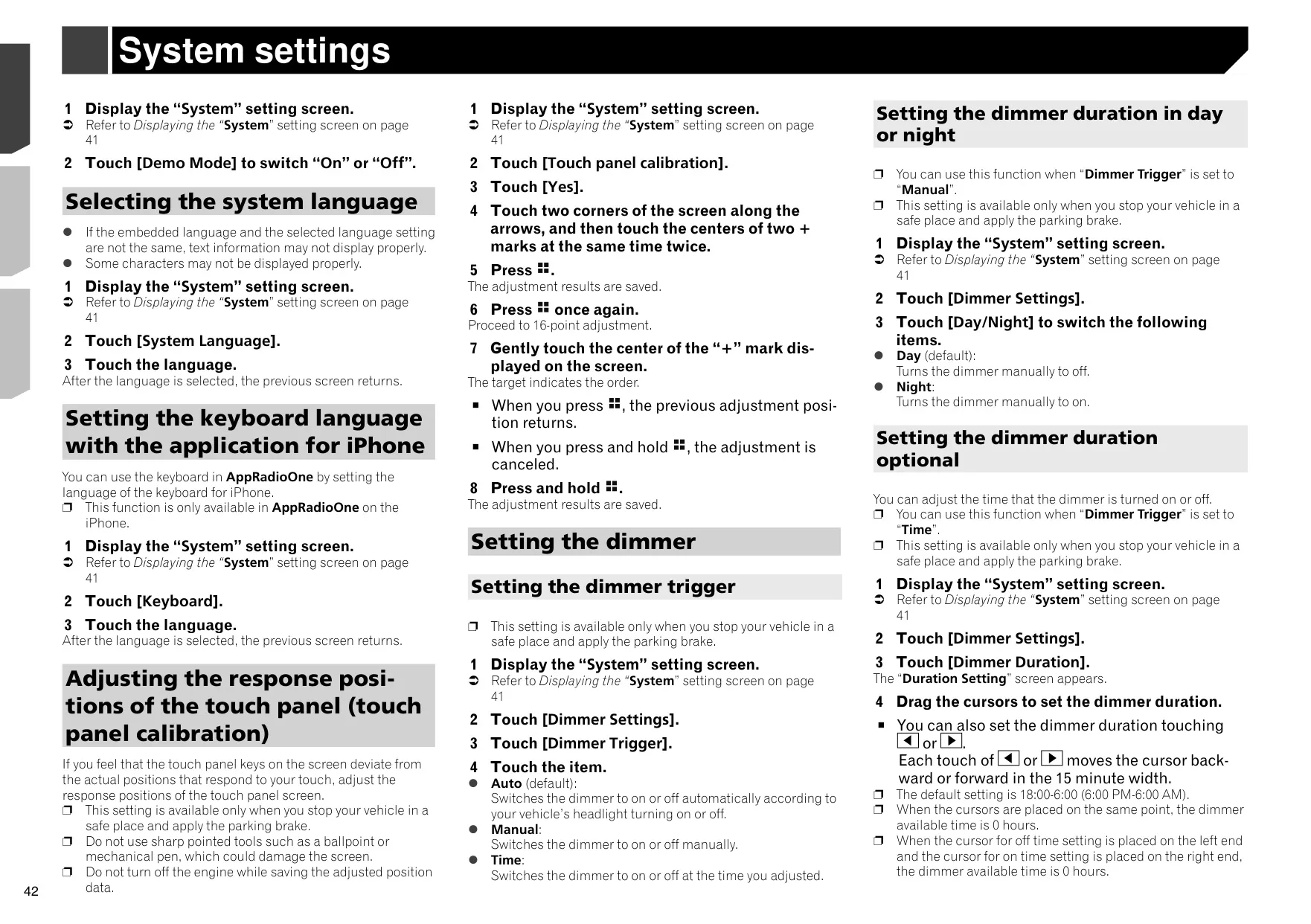
For video, the unit plays DVD-Video and DivX files, with an eight-level DVD parental lock and DivX VOD registration. It has inputs for a rear view camera and a second camera, plus a V OUT jack to drive rear-seat screens. You can customize the screen with wallpapers, seven illumination colors, a rainbow mode, theme colors and clock styles. Other features include an automatic or timed dimmer, touch panel calibration, a Favorites menu with up to 12 shortcuts, and firmware updates over USB.
Frequently Asked Questions (FAQs)
Can't find the answer you need? Here are some frequently asked questions about the Pioneer AVH-X5800BHS Multimedia Receiver, and we answer them below.