Pioneer DEH-150MP Audio Receiver Instruction Manual

Pioneer DEH-150MP Audio Receiver






Pioneer DEH-150MP Receiver Instructions
Here we offer the Pioneer DEH-150MP Audio Receiver manual completely free and in English. We have cataloged this manual in the Audio Receivers section on Manualverse, and it has been rated by 1 users with an average rating of 5. If you have any specific questions about Pioneer DEH-150MP Audio Receiver, we suggest checking the Frequently Asked Questions (FAQs) section of this manual.
Product Images


Pioneer DEH-150MP Audio Receiver Specifications
| Feature | Specification |
|---|---|
| Product Type | CD RDS Receiver (single-DIN car head unit) |
| Power Source | 14.4 V DC (10.8 V to 15.1 V allowable) |
| Grounding System | Negative type |
| Maximum Current Consumption | 10.0 A |
| Fuse | 10 A |
| DIN Chassis Dimensions (W × H × D) | 178 mm × 50 mm × 165 mm (7 in. × 2 in. × 6-1/2 in.) |
| DIN Nose Dimensions (W × H × D) | 188 mm × 58 mm × 16 mm (7-3/8 in. × 2-1/4 in. × 5/8 in.) |
| D Chassis Dimensions (W × H × D) | 178 mm × 50 mm × 165 mm (7 in. × 2 in. × 6-1/2 in.) |
| D Nose Dimensions (W × H × D) | 170 mm × 46 mm × 16 mm (6-3/4 in. × 1-3/4 in. × 5/8 in.) |
| Weight | 1 kg (2.2 lbs) |
| Maximum Power Output | 50 W × 4; 70 W × 1 / 2 Ω (for subwoofer) |
| Continuous Power Output | 22 W × 4 (50 Hz to 15,000 Hz, 5 % THD, 4 Ω load, both channels driven) |
| CEA2006 Power Output | 14 W RMS × 4 channels (4 Ω and ≤ 1 % THD+N) |
| CEA2006 S/N Ratio | 91 dBA (reference: 1 W into 4 Ω) |
| Load Impedance | 4 Ω (4 Ω to 8 Ω allowable) |
| Recommended Speakers | Over 50 W output, 4 Ω to 8 Ω impedance (do not use 1 Ω to 3 Ω speakers) |
| Preout Maximum Output Level | 2.0 V |
| Loudness Contour | +10 dB (100 Hz), +6.5 dB (10 kHz) (volume: –30 dB) |
| Equalizer | 5-band graphic: 80 Hz / 250 Hz / 800 Hz / 2.5 kHz / 8 kHz |
| Equalization Range | ±12 dB (2 dB step) |
| Subwoofer Output | Mono |
| Subwoofer Cut-off Frequency | 50 Hz / 63 Hz / 80 Hz / 100 Hz / 125 Hz / 160 Hz / 200 Hz |
| Subwoofer Slope | –6 dB/oct, –12 dB/oct |
| Subwoofer Gain | +6 dB to –24 dB |
| Subwoofer Phase | Normal / Reverse |
| CD System | Compact disc audio system |
| Usable Discs | 12 cm CD, CD-R, CD-RW (8 cm discs not supported) |
| CD Signal-to-Noise Ratio | 94 dB (1 kHz) (IHF-A network) |
| Number of Channels | 2 (stereo) |
| MP3 Decoding Format | MPEG-1 & 2 Audio Layer 3 |
| MP3 Bit Rate | 8 kbps to 320 kbps (CBR), VBR |
| MP3 Sampling Frequency | 8 kHz to 48 kHz (32 kHz, 44.1 kHz, 48 kHz for emphasis) |
| Compatible ID3 Tag Versions | 1.0, 1.1, 2.2, 2.3, 2.4 |
| WMA Decoding Format | Ver. 7, 7.1, 8, 9, 10, 11, 12 (2 ch audio) |
| WMA Bit Rate | 48 kbps to 320 kbps (CBR), 48 kbps to 384 kbps (VBR) |
| WMA Sampling Frequency | 32 kHz, 44.1 kHz, 48 kHz |
| WAV Signal Format | Linear PCM & MS ADPCM (non-compressed) |
| WAV Quantization Bits | 8 and 16 (LPCM), 4 (MS ADPCM) |
| WAV Sampling Frequency | 16 kHz to 48 kHz (LPCM); 22.05 kHz and 44.1 kHz (MS ADPCM) |
| Playable Folder Hierarchy | Up to 8 tiers |
| Playable Folders / Files | Up to 99 folders / up to 999 files |
| File System | ISO 9660 Level 1 and 2, Romeo, Joliet |
| Multi-session Playback | Compatible |
| File/Folder Name Display | First 32 characters |
| FM Frequency Range | 87.9 MHz to 107.9 MHz |
| FM Usable Sensitivity | 9 dBf (0.8 µV/75 Ω, mono, S/N: 30 dB) |
| FM Signal-to-Noise Ratio | 72 dB (IHF-A network) |
| AM Frequency Range | 530 kHz to 1,710 kHz |
| AM Usable Sensitivity | 25 µV (S/N: 20 dB) |
| AM Signal-to-Noise Ratio | 62 dB (IHF-A network) |
| AUX Input | 3.5 mm stereo mini jack (front panel) |
| Remote Control Battery | One CR2025 (3 V) lithium battery |
| Remote Lead Rating | Blue/white, max. 300 mA 12 V DC |
| Installation Angle | Less than 60° |
| Rear Clearance | 5 cm on all sides around the rear panel |
Pioneer DEH-150MP Audio Receiver Details
The Pioneer DEH-150MP is a single-DIN CD receiver that plays CDs and compressed audio files, with an AM/FM tuner and an auxiliary input. Most functions are run from the MULTI-CONTROL (M.C.) dial: you turn it to adjust the volume and browse menus, and press it to confirm a choice. The first time you turn on the ignition after installation, a SET UP menu appears and walks you through setting the clock. If you don't touch anything for 30 seconds, the menu goes away.
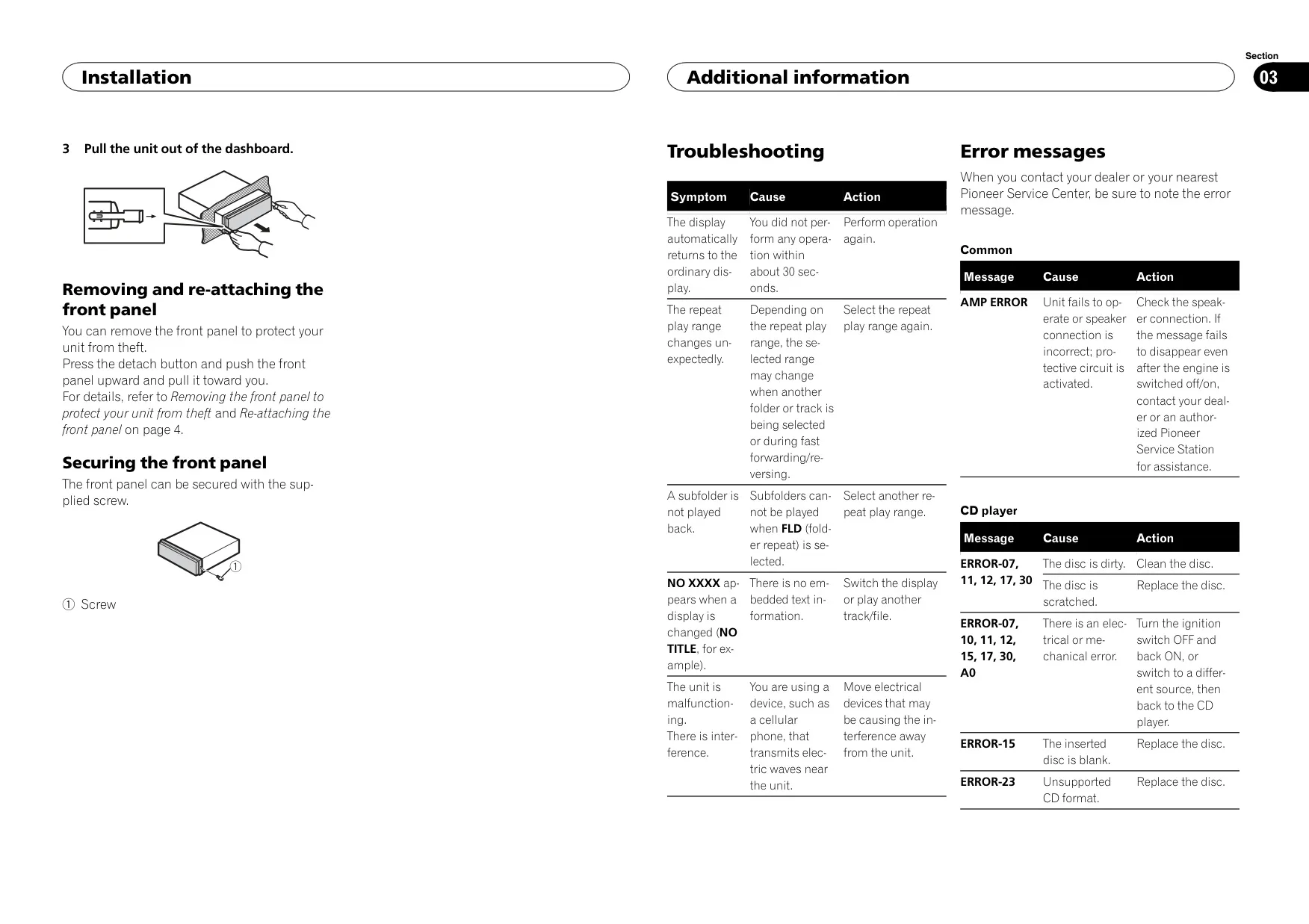
To help prevent theft, the front panel comes off with the detach button. You push it upward and then pull it toward you. Pioneer recommends keeping the detached panel in a protective case, out of direct sunlight and heat. When you put it back, slide it to the left so the tabs line up, then press the right side until it seats firmly. A supplied screw can also lock the panel in place, and the included infrared remote copies the main head-unit controls.
The tuner has three FM bands (FM1, FM2 and FM3) and one AM band. Each band holds six presets on buttons 1 to 6. BSM (Best Stations Memory) automatically saves the six strongest stations in order of signal strength. LOCAL seek tuning limits seeking to strong stations, with four levels on FM and two on AM. The SEEK setting decides whether the left and right keys tune manually (MAN) or step through presets (PCH). Press DISP to switch between broadcast information, frequency and clock.
During disc playback, you can browse a file and folder name list and use dedicated buttons for repeat (ALL, ONE or FLD), random play and pause. The Sound Retriever improves compressed audio with two modes. Mode 1 suits files with a low compression rate, and mode 2 suits files with a high compression rate. The display can show track information, file information, elapsed time, the clock or a spectrum analyzer. Holding BAND takes you back to the root folder.
The audio menu includes fader and balance controls and seven equalizer presets: POWERFUL, NATURAL, VOCAL, CUSTOM1, CUSTOM2, FLAT and SUPER BASS. CUSTOM1 is saved separately for each source, while CUSTOM2 applies to all sources. Loudness has three levels (LOW, MID and HI) that make up for weak bass and treble at low volume. Bass Boost adds 0 to +6 levels. SLA (source level adjustment) changes each source's volume by +4 to –4 relative to FM, so the volume doesn't jump when you switch sources.
The HPF (high pass filter) keeps low frequencies out of the front and rear speakers. It offers the same cut-off points as the subwoofer crossover and the same –6 or –12 slopes. In the initial menu, SP-P/O MODE sets how the rear speaker leads and the RCA output are used: REAR/SUB.W, SUB.W/SUB.W or REAR/REAR. With SUB.W/SUB.W, you can run a passive subwoofer directly from the rear leads, without an external amplifier.
Other system options include a 12-hour or 24-hour clock, an AUX on/off setting, a dimmer for the illumination and a DEMO OFF option to turn off the demo display. The unit can be mounted with either DIN front-mount or DIN rear-mount installation. Supplied extraction keys are used to remove it. The protective circuit shows AMP ERROR if the speakers are wired incorrectly. Disc errors appear as numbered codes such as ERROR-07, ERROR-15 and ERROR-23, and SKIPPED or PROTECT warnings indicate DRM-protected files.
Frequently Asked Questions (FAQs)
Can't find the answer you need? Here are some frequently asked questions about the Pioneer DEH-150MP Audio Receiver, and we answer them below.