
Genie Chainmax 1000 Model 3022 Instruction Manual

Genie Chainmax 1000 Model 3022










Chainmax 1000 Model 3022 Instructions
Here we offer the Genie Chainmax 1000 Model 3022 manual completely free and in English. We have cataloged this manual in the Garage Door Openers section on Manualverse, and it has been rated by 1 users with an average rating of 5. If you have any specific questions about Genie Chainmax 1000 Model 3022, we suggest checking the Frequently Asked Questions (FAQs) section of this manual.
Product Images


Genie Chainmax 1000 Model 3022 Garage Door Opener Specifications
| Feature | Specification |
|---|---|
| Manufacturer | The Genie Company (GMI Holdings, Inc.) |
| Model | Chainmax 1000, Model 3022 |
| Drive Type | Chain drive (the manual also covers belt and screw drive models) |
| Compatible Doors | Sectional or one-piece residential garage doors |
| Power Connection | Grounded electrical plug, grounded outlet only, no extension cord |
| Recommended Opener Mounting Height | 7 ft (2.1 m) or more above the floor |
| Emergency Release Height | At least 6 ft (1.8 m) above the floor |
| Wall Console Minimum Height | 5 ft (1.5 m) above the floor |
| Contact Reverse Test Object | 1-1/2 in (3.8 cm) high object, like a 2 x 4 in board laid flat |
| Reversal Time on Contact | Within 2 seconds, back to full open |
| Safety Sensors | Safe-T-Beam® infrared system (transmitter red LED, receiver green LED) |
| Contact Safety System | Safe-T-Reverse® with Force Control |
| Remote Security | Intellicode® rolling code encryption |
| Remote Battery | CR2032 coin cell |
| Light Auto-Off Delay | 4 minutes after activation |
| Light Bulb Type | A19 incandescent, CFL or LED, 100 W maximum (no short-neck bulbs) |
| Bulb for Integrated Aladdin Connect® Models | 40 W or equivalent, 100 W maximum |
| Programming Step Time Limit | 30 seconds |
| Force Adjustment Levels | 9 (1 lowest to 9 highest) |
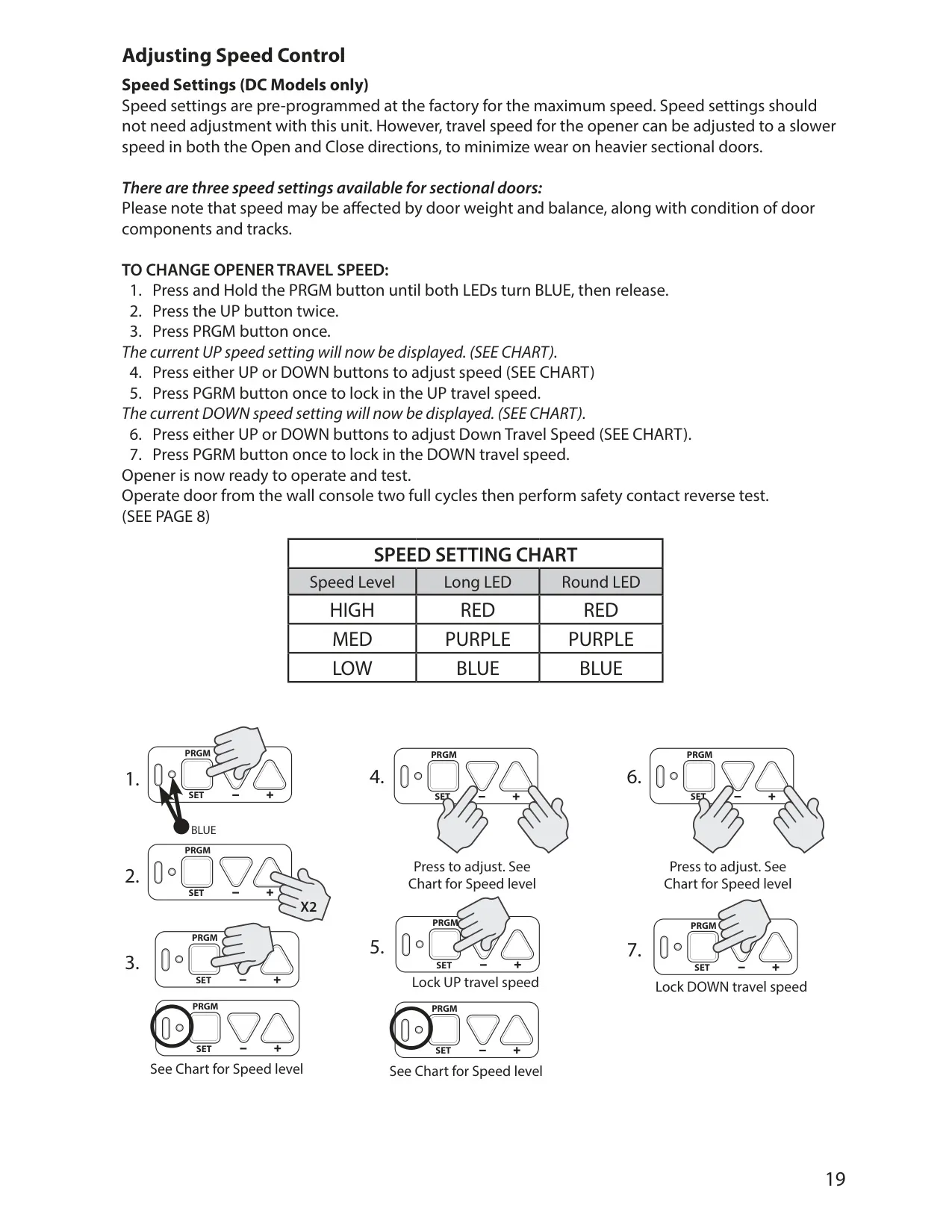
| Speed Settings (DC models) | 3 levels: High, Medium, Low (factory set to maximum) |
| Keypad PIN Length | 3 to 8 digits |
| Keypad Active Time After Entry | 15 seconds |
| Keypad Mounting | At least 5 ft above the floor, 3/32 in pilot hole, 1/8 in screw gap |
| Vehicle System Compatibility | HomeLink®, Car2U® |
| Aladdin Connect® Capacity | Up to 20 openers and 20 users per account |
| Aladdin Connect® App Requirements | iOS 8 and higher, Android 4.4 and higher |
| Accessory Ports | NETWORK and BBU dongle ports |
| Battery Backup | Genie Model GBB-BX, replacement battery P/N 36959A (Series 30XX/40XX) |
| Rail Lengths (Chain/Belt) | 7, 8, 10, 12, 14 ft |
| Release Cord Assemblies | 7 ft (32 in), 8 ft (44 in), 9-14 ft (116 in) |
| Customer Service | 1-800-35-GENIE (1-800-354-3643) |
| Manual Reference | 39495503724, 10/2018 |
Genie Chainmax 1000 Model 3022 Details
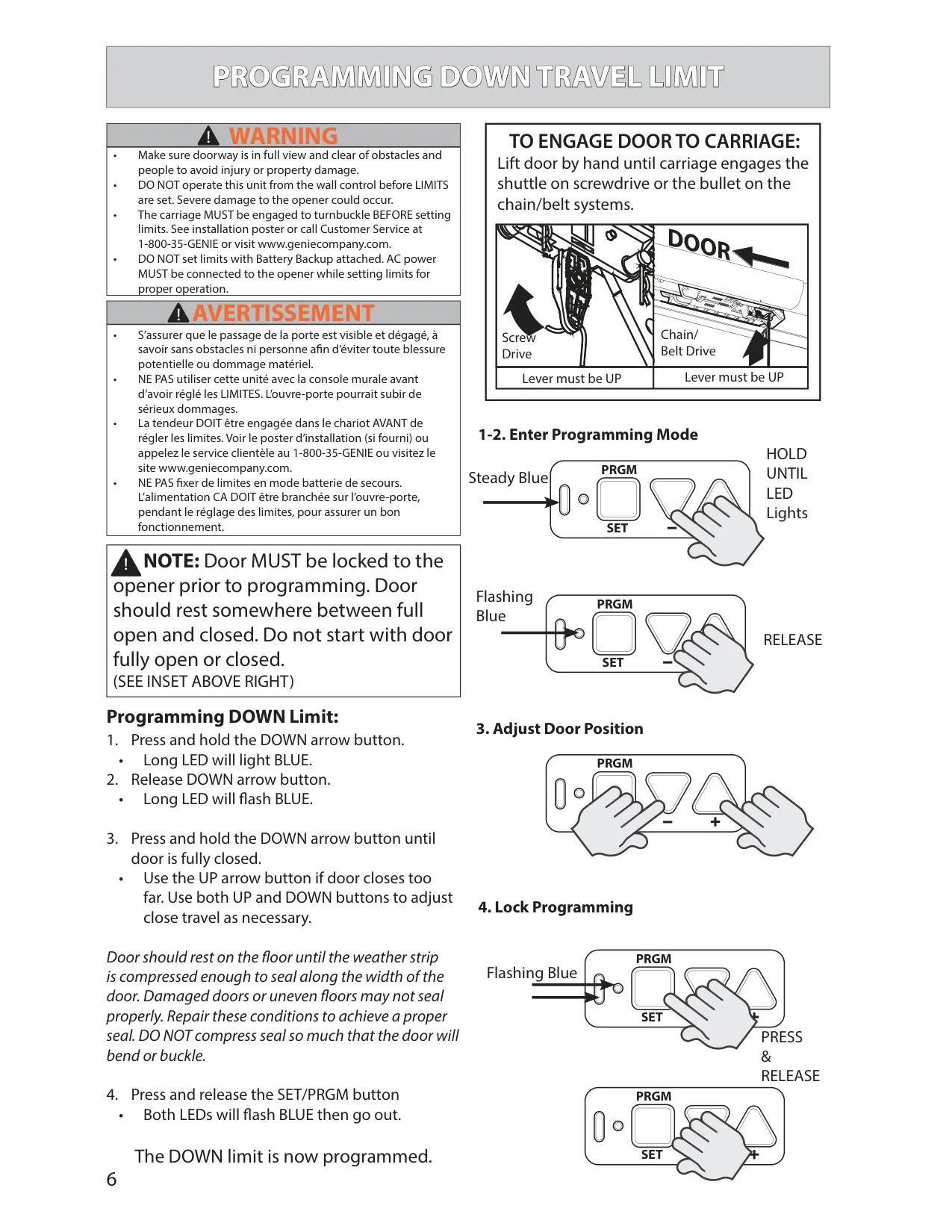
The Genie Chainmax 1000 Model 3022 uses one programming interface on the powerhead: a Program/Set button, an Open Travel button, a Close Travel button, and two status indicators, a round LED and a long LED. Settings go in a fixed order: down limit, up limit, force control, contact reverse test, remote programming, accessories, and battery backup last. If a step is not finished in time, both LEDs turn red and you start that step again.
Before you set the travel limits, lock the door to the opener by lifting it by hand until the carriage catches the chain bullet, and leave the door partly open. For the down limit, the door should squeeze the weather strip just enough to seal across its full width without bending. On sectional doors, the up limit should leave the door seal even with the header. On one-piece doors, the door arms must stay in line and push forward and up. AC power must be connected while you set limits, not the battery backup.
Force control sets itself the first time you use the wall control. The door has to complete one full close-and-open cycle before the opener records the values. If the door stops before touching the test board, or doesn't reverse after touching it, the manual says to reset the down limit, run the force cycle again, and repeat the test. You should only change force manually for very stiff weather seals or doors that stop partway through travel, and never to make up for a damaged or unbalanced door.
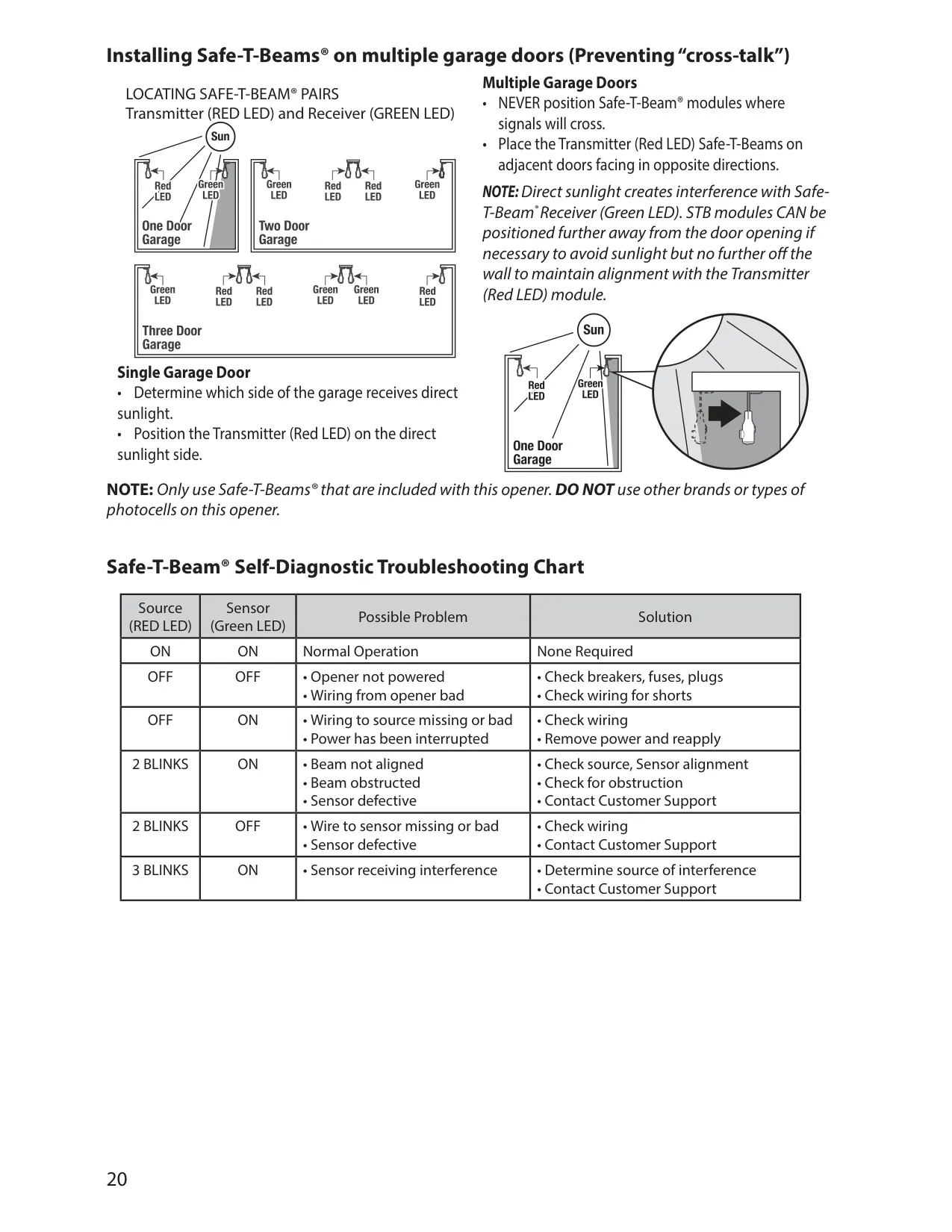
The Safe-T-Beam® system only works during down travel. If the beam is blocked, the door stops and goes back to full open. You can override it only by holding down the button on the wired wall console. With several doors, the sensor pairs should never cross signals, so adjacent doors' sensors should face opposite directions. Direct sunlight can interfere with the green-LED receiver, so the manual suggests putting the receiver on the shaded side. Blink codes on the sensors help you find wiring, alignment and interference problems.
The wired wall console has an open/close button, manual light control, and a Sure-Lock™ switch that blocks all remote control operation. The included remotes come programmed from the factory. You program each button on each extra remote separately, standing at least 5 feet from the powerhead. Clearing the memory erases every remote, keypad and vehicle transmitter, but the Aladdin Connect® link and the wireless wall console stay programmed. The wall console keeps working normally.
On models with Integrated Aladdin Connect®, the app sends notifications whenever the door is used from the app, a remote or the wall console. It also keeps usage reports with dates, times and the user who operated the door, and lets you set rules that close a door at set times. Before the door moves without anyone present, the opener light and a sound go on as a warning. A special warning placard for unattended operation replaces the standard one.
Monthly maintenance covers the contact reverse test, greasing rollers and hinges, checking the Safe-T-Beam® wiring and lenses, checking door balance, and testing the battery backup. To check balance, pull the emergency release, raise the door 3 to 4 feet by hand, and let go. The door should stay put or drift down slowly. The powerhead LEDs also show codes for problems such as a thermal cutout, a radio receiver error, a program error or limits that aren't set.
Frequently Asked Questions (FAQs)
Can't find the answer you need? Here are some frequently asked questions about the Genie Chainmax 1000 Model 3022 Garage Door Opener, and we answer them below.